Lookup Tools
Analysis
Bulk & Enterprise
Resources
Close
Zip Encrypt Logo

Secure File Encryption for macOS

Zip Encrypt turns any file or folder into a password-protected, encrypted archive in seconds. Military-grade AES-256 encryption with five output formats — engineered for maximum security and cross-platform compatibility.

Coming soon to the Mac App Store

Encryption in Your Hands

Every file you send, store, or archive is a potential exposure. Email attachments traverse third-party servers. Cloud storage providers hold your keys. Shared drives are one misconfiguration away from public access. Zip Encrypt puts the encryption in your hands, locally, before your data ever leaves your machine.

🔒 Local-Only Encryption

All encryption happens on-device using AES-256. Your password never leaves your Mac.

🎯 Zero Complexity

No accounts. No subscriptions. No telemetry. Simple, focused file encryption.

🌐 Cross-Platform

Five encryption formats ensure your files open on Windows, macOS, and Linux.

Simple, Powerful Workflow

1

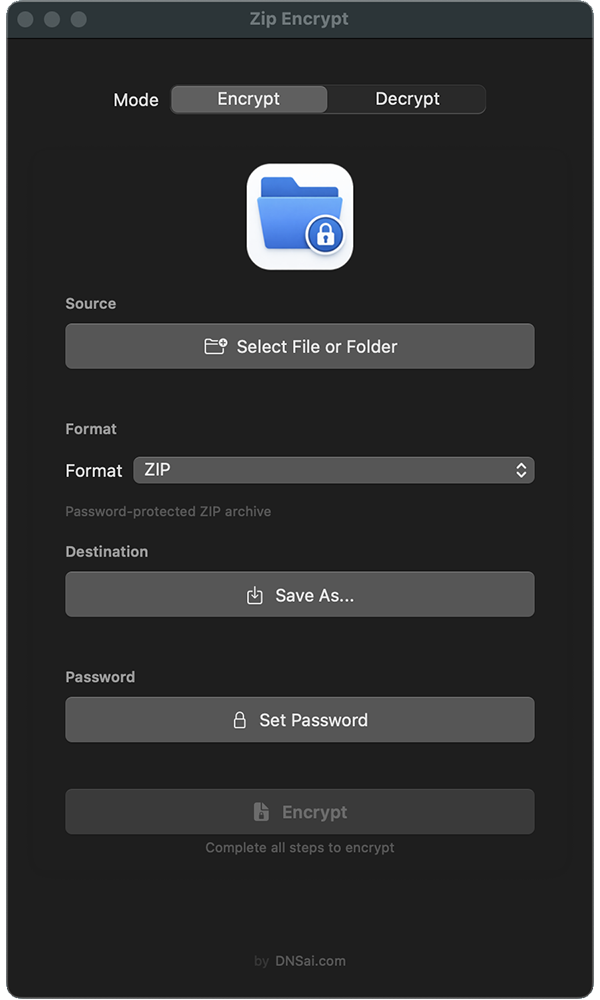
Select Files

Drag and drop or click to select files or folders.

2

Choose Format

Pick from ZENC, ZIP, 7z, TAR, or GZ based on your needs.

3

Set Password

Choose destination and create a strong password — the only key to your data.

4

Encrypt

One click. Zip Encrypt handles the rest.

Native macOS Application

Built with Swift and SwiftUI for optimal performance. No Electron wrappers, no embedded browsers, no interpreted runtimes — just pure native macOS engineering.

Built for macOS

  • Instant Launch: Native performance with minimal system resources
  • Streaming Encryption: Process files of any size in 1 MB chunks without memory bloat
  • Authenticated Encryption: AES-GCM detects tampering and corruption automatically
  • Complete Privacy: No network calls, no telemetry, no analytics
  • Drag-and-Drop: Natural macOS integration with Finder and file dialogs
  • Folder Encryption: Preserves complete directory structure within archives

Requires macOS 12.0 or later

Zip Encrypt Interface

Technical Specifications

Encryption Algorithms

  • AES-256-GCM: 256-bit key, 96-bit nonce, 128-bit authentication tag (ZENC, TAR, GZ)
  • AES-256-CBC: 256-bit key, SHA-256 key derivation with 2^19 iterations (7z)
  • ZipCrypto: 96-bit stream cipher, PKWARE specification (ZIP)

Architecture

  • Streaming encryption processes files in 1 MB chunks — no file size limit, no memory bloat
  • Per-chunk unique nonce generation prevents pattern analysis across blocks
  • Authenticated encryption (GCM) provides integrity verification on every decryption
  • Native Swift implementation — no Electron, no web views, no runtime overhead
  • Folder encryption preserves complete directory structure within the archive

Security Model

  • All encryption is performed locally, on-device
  • Passwords are never stored, transmitted, or logged
  • No network calls, no telemetry, no analytics
  • No password recovery mechanism — by design. If the password is lost, the data is unrecoverable
  • Authenticated encryption formats (ZENC, TAR, GZ) detect and reject tampered or corrupted archives

Supported Formats

  • ZENC (AES-256-GCM): Maximum security — proprietary format with authenticated encryption. Every byte is encrypted and integrity-verified. Use when security is the priority.
  • ZIP (ZipCrypto 96-bit): Universal compatibility — cross-platform standard since 1989. Opens natively on Windows, macOS, Linux, iOS, and Android without additional software. Use when sharing with anyone, any platform.
  • 7z (AES-256): Strong encryption with compression — AES-256 with LZMA2 compression. Encrypts file headers by default. Use when you need excellent compression ratios.
  • TAR (AES-256-GCM): Unix-standard archive — traditional format with authenticated encryption. Preserves file permissions and metadata. No compression for fastest throughput. Use when speed matters more than size.
  • GZ (AES-256-GCM): Compressed and authenticated — TAR archive with gzip compression before AES-256-GCM encryption. Optimal balance between size reduction and security. Use when archiving large files.

Cross-Platform Sharing Guide

Sending to Windows Users

Use ZIP (opens natively) or 7z (requires free 7-Zip utility)

Sending to Mac Users

Use ZIP (native), 7z (Keka/The Unarchiver), or share Zip Encrypt

Sending to Linux Users

Use ZIP or 7z — both supported via built-in tools and p7zip

Email Attachments

Use ZIP for universal compatibility or GZ for smaller file size with strong encryption

Maximum Security

Use ZENC — strongest authenticated encryption, Zip Encrypt only

Long-Term Archival

Use ZENC, TAR, or GZ for full AES-256-GCM protection

Frequently Asked Questions

Which format should I use?

Use ZIP when sharing with anyone — it opens everywhere. Use ZENC when security is the priority. Use 7z when you need strong encryption with excellent compression.

What happens if I forget my password?

Your files cannot be recovered. There is no password reset, no backdoor, no recovery option. This is a deliberate security design decision. Use a password manager.

Is ZIP encryption secure enough?

ZIP uses legacy ZipCrypto with a 96-bit key, which is significantly weaker than AES-256. It provides adequate protection against casual access but should not be used for sensitive or regulated data. For serious security, use ZENC, 7z, TAR, or GZ.

What does "authenticated encryption" mean?

AES-GCM (used by ZENC, TAR, and GZ) doesn't just encrypt your data — it generates an authentication tag for each encrypted block. On decryption, this tag is verified, which means any modification, corruption, or tampering is detected and the decryption is rejected.

Is there a file size limit?

No practical limit. Streaming encryption processes data in 1 MB chunks, so even multi-gigabyte files are handled efficiently without loading the entire file into memory.

Can I encrypt entire folders?

Yes. Select any folder and Zip Encrypt will recursively archive its contents, preserving the full directory structure, and encrypt the resulting archive.

Secure Your Files Today

Military-grade encryption for macOS. No subscriptions, no complexity, no compromises. Your files, your password, your control.

Coming soon to the Mac App Store