Understanding MX Records in DNS
MX records, short for Mail Exchange records, are critical for email delivery. They tell the world which mail servers are responsible for receiving emails for your domain. Without proper MX records, your domain can't receive email, and senders will receive bounce messages or delivery failures.
Look Up MX Records
Check MX records for any domain using our free DNS lookup tool.
Look Up MX Records →What Is an MX Record?
An MX record directs email traffic by pointing your domain to the mail server that should handle its messages. Each MX record has two parts: a priority number and a mail server domain name. For example:
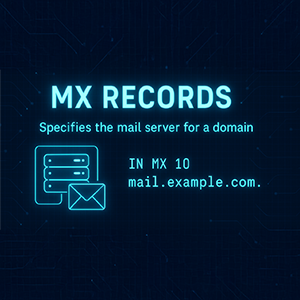
This example shows that email for example.com should be routed to mail.example.com, with a priority of 10.
The mail server itself must also have an A or AAAA record that resolves to an IP address.
Without a valid MX record, email for your domain will fail to arrive.
How MX Record Priorities Work
When you define multiple MX records, the one with the lowest priority number is used first. If that server is unavailable, the next lowest is tried. This allows for fallback and improved uptime.
10 mail1.example.com
20 mail2.example.com
In this case, mail1 is the primary server, and mail2 acts as backup.
How to Look Up an MX Record
You can check your MX records using built-in tools on your system. Here's how:
Windows
1. Open cmd or PowerShell.
2. Enter this command:
macOS
1. Open Terminal.
2. Type one of the following:
or
Linux
1. Open your terminal.
2. Use either command:
or
Why MX Records Matter
- They are required for email delivery to your domain.
- They support multiple mail servers for redundancy and failover.
- They work together with SPF, DKIM, and DMARC for email security.
- They must point to domain names, not raw IP addresses.
Managing MX Records
You can configure your MX records through your DNS provider's dashboard. This may be your domain registrar (like Namecheap or GoDaddy) or a DNS service like Cloudflare, DigitalOcean, or AWS Route 53.
- Registrar DNS: Basic dashboards allow direct edits to MX records.
- External DNS: Advanced control and DNS analytics through third-party platforms.
Make sure to replicate your MX settings if switching providers to avoid email downtime.
Example: Google Workspace
Google Workspace now uses a single MX record. Per Google's own setup documentation, "The Google Workspace MX record value is smtp.google.com", published at priority 1:
1 smtp.google.com.
The legacy five-record set
You will still see this older configuration on a great many domains, and it still works:
1 ASPMX.L.GOOGLE.COM.
5 ALT1.ASPMX.L.GOOGLE.COM.
5 ALT2.ASPMX.L.GOOGLE.COM.
10 ALT3.ASPMX.L.GOOGLE.COM.
10 ALT4.ASPMX.L.GOOGLE.COM.
Google's guidance on it is explicit: "If you started using Google Workspace before 2023, your domain might have different MX record values that start with aspmx. If your email is working, no changes are required. Any account can use the new single MX record value, but the legacy MX record values are still supported."
In other words, seeing aspmx hostnames on a domain tells you it is on Google Workspace and that it was set up before 2023 or copied from older instructions. It does not mean anything is misconfigured. This matters when you are reading someone else's MX records rather than writing your own — both patterns are current, and only one of them is what Google documents today. Checked 2026-08-01, shopify.com publishes the legacy five-record set while Google's documentation has recommended the single record for years.
An earlier version of this page showed only the five-record set and described it as the Google Workspace configuration. That was out of date and has been corrected.
MX vs SPF, DKIM, and DMARC
MX records alone are not enough to protect your email. They should work alongside:
- SPF: Defines authorized senders for your domain.
- DKIM: Adds digital signatures to outgoing emails.
- DMARC: Tells recipients how to handle failed SPF/DKIM checks.
Together, they ensure your domain can send and receive email securely.
Summary
MX records are the gateway to your domain's inbox. They route incoming email to the correct server and enable redundancy through priority settings. Whether you're setting up a personal domain or managing a corporate mail system, understanding how MX records work is essential to running reliable and secure email services.
Share this article

Manage Your Domain Portfolio in One Place
DNSai Domain Manager — track DNS records, WHOIS expirations, and SPF, DKIM and DMARC status for every domain you own, from one dashboard. Built for teams sitting on dozens or thousands of domains across brands and acquisitions.
Learn More about DNSai Domain ManagerStart your free account — app.dnsai.com